



Personal branding
LinkedIn SEO: The 2026 Guide to Personal Branding Visibility
In 2026, LinkedIn SEO has become the foundation of personal branding success. With the platform now surpassing one billion members, a high-quality profile is no longer enough, you must optimize it for the search algorithm to stand out.
Recruiters and potential partners use LinkedIn as their primary search tool, yet a minority of professionals actually optimize their profiles. This creates a significant opportunity. A keyword-optimized profile can receive 40% more views and triple the amount of inbound inquiries compared to a generic one.
This guide outlines how the LinkedIn search algorithm works and provides a blueprint to help you rank higher, whether you are a founder, executive, or job seeker.
How LinkedIn Search Works (Key Ranking Factors)
LinkedIn’s search function acts as a matchmaking engine, connecting users with the most relevant people. To improve your visibility, you must align your profile with the specific signals the algorithm prioritizes.
Headline and Job Title
Your profile headline is the most heavily weighted field. The algorithm gives high priority to exact keyword matches in your headline and current position. For example, if a user searches for "Data Science Lead," LinkedIn favors profiles that use those exact words. Strategic placement is more effective than frequency; one well-placed keyword in your headline can outrank multiple mentions hidden in other sections.
About Summary Thought Leadership and Experience
LinkedIn scans the text in your summary and job descriptions for industry-relevant terms such as specific skills, tools, and previous titles. While you should include these keywords naturally, avoid "keyword stuffing." The algorithm can detect and penalize repetitive, spammy profiles. Focus on weaving keywords into genuine descriptions of your achievements.
Skills and Endorsements
The Skills section allows you to list up to 50 items that are directly indexed by search. Including specific terms like "Project Management" or "Python" categorizes your profile for those queries. Your top three skills are the most visible and carry the most weight. Furthermore, gathering endorsements for these skills provides social proof that signals your expertise to the algorithm.
Network Relevance
Search results are personalized based on the searcher’s network. Connections in the 1st, 2nd, and 3rd degree are often boosted in results. By growing a relevant network and engaging in industry groups, you increase the likelihood of appearing in the search results of hiring managers and decision-makers within your field.
Profile Completeness and Activity
LinkedIn rewards users who maintain active, fully completed profiles. This includes filling out education, location, and every available experience slot. Beyond completion, regular activity, such as posting, commenting, and logging in, signals that you are an engaged user, which increases your search frequency.
Keyword Relevance and Standardization
While the search is not case-sensitive, it favors exact matches for technical skills and certifications. Use industry-standard terminology to ensure you are discoverable. For instance, if your internal company title is "Data Guru," change it to "Data Analyst" on LinkedIn to match what recruiters actually search for. Avoid creative titles like "Marketing Magician," as the algorithm does not prioritize synonyms.
The LinkedIn Profile SEO Optimization Blueprint
Optimizing your profile for LinkedIn SEO means rebuilding it for search visibility without losing human appeal. This step-by-step plan helps you overhaul your profile to attract the right audience, whether you are a founder, executive, consultant, or job seeker.
Step 1: Define Your Personal Brand Focus and Keywords
Successful LinkedIn SEO begins with clarity on what you want to be known for and identifying the specific terms that will get you discovered.
Identifying Your Keywords
Brainstorm the terms recruiters or clients would use to find someone with your expertise. Use these methods to build your list:
- LinkedIn Search Auto-Suggest: Type a job title or skill into the search bar. If "Marketing Director" suggests "Marketing Director SaaS" or "Marketing Director Healthcare," you have found popular, high-volume search combinations.
- Competitor Analysis: Review the profiles of top performers in your field. Note the recurring phrases, certifications, and tools they highlight in their headlines and "About" sections.
- Job Listings and Industry Content: For job seekers, analyze five recent job postings for your target role. The skills and requirements repeated across these listings are the exact keywords recruiters use to filter candidates.
- Combine Role and Niche: Avoid being too broad (e.g., just "Consultant") or using internal jargon. Use combinations like "Product Manager | FinTech & Payments" to capture specialized searches.
- Adopt the Searcher's Mindset: * Founders/Executives: Consider what an investor or partner searches (e.g., "SaaS CEO," "Growth Strategy").
- Consultants: Focus on problem-solving terms (e.g., "Process Improvement," "Sales Coach").
- Job Seekers: Use exact job titles and technical stacks (e.g., "Full-Stack Developer | Python | React").
Organizing Your Keyword List
By the end of your research, categorize your terms into two groups:
- Primary Keywords: Your core role and top-level skills (e.g., Digital Marketing, SEO).
- Secondary Keywords: Specific tools, methodologies, and industries (e.g., HubSpot, B2B Lead Gen, Google Analytics).
Step 2: Craft a Keyword-Rich Headline
Your headline is prime real estate. It is the first thing people see in search results, and LinkedIn’s algorithm gives it the highest weight for SEO. In 2026, you have up to 220 characters to blend important keywords with a glimpse of your professional value.
The Headline Formula
A proven approach is to follow a clear structure: Title/Role | Key Skills or Expertise | Outcome or Credibility
Instead of just listing a job title or using generic phrases like "Experienced Professional," mix in searchable terms.
- Founder: "Founder & CEO @ MedTech Innovators | Healthcare AI Advocate | Forbes 30 Under 30"
- Executive: "Chief Marketing Officer (CMO) | Digital Transformation Leader | 20+ Years Growing Global Brands"
- Consultant: "B2B SaaS Marketing Consultant | Demand Gen & SEO Expert | Helping Startups 2x Pipeline"
- Job Seeker: "Full-Stack Developer (JavaScript, Python) | AWS Cloud & DevOps | Open to SRE Roles"
Headline Best Practices
- Use Separators: Vertical bars (|), bullets (•), or slashes (/) make your headline easy to scan.
- Front-Load Terms: On mobile, only the first 60–80 characters are visible. Put your most critical role or skill at the very beginning.
- Focus on Value: Avoid clichés like "hard-working" or "dynamic." Every word should either be a searchable keyword or a specific metric of success (e.g., "3x President’s Club Winner").
Step 3: Optimize Your "About" Section (The Keyword Goldmine)
The About section is a powerful SEO asset with a 2,600-character limit. It allows you to integrate a high volume of keywords naturally while telling a compelling story.
Structure Your Narrative
- The Hook: A bold opening statement about who you are and what you do.
- Core Expertise: 1–2 paragraphs explaining your background. Mention your primary tools and niches (e.g., "I’ve developed expertise in SEO and content strategy using Google Analytics and HubSpot").
- Achievements: Use a bulleted list to highlight 3–5 career accomplishments with hard metrics. Numbers draw the eye and provide social proof.
- Personal Touch: Briefly mention your values or professional drivers to humanize your brand.
- Call to Action (CTA): End with a clear next step, such as "Feel free to connect to discuss DevOps" or "Email me at [address] for consulting inquiries."
SEO and Readability Tips
- 8–12 Keywords: Distribute your primary and secondary keywords naturally throughout the text.
- Use First Person: Speak as "I" to appear more approachable and authentic.
- Break Up Text: Use short paragraphs and white space. Large blocks of text are difficult to read, especially on mobile devices.
- Tailor to Your Goal:
- Founders: Emphasize your vision and company milestones.
- Consultants: Address specific client pain points and the solutions you provide.
- Job Seekers: Explicitly state the roles you are targeting and the value you bring to a new team.
An optimized About section increases keyword density while keeping the reader engaged. Update this section at least once a year to reflect new skills and current achievements.
Step 4: Refine Your Experience Section with Impact and Keywords
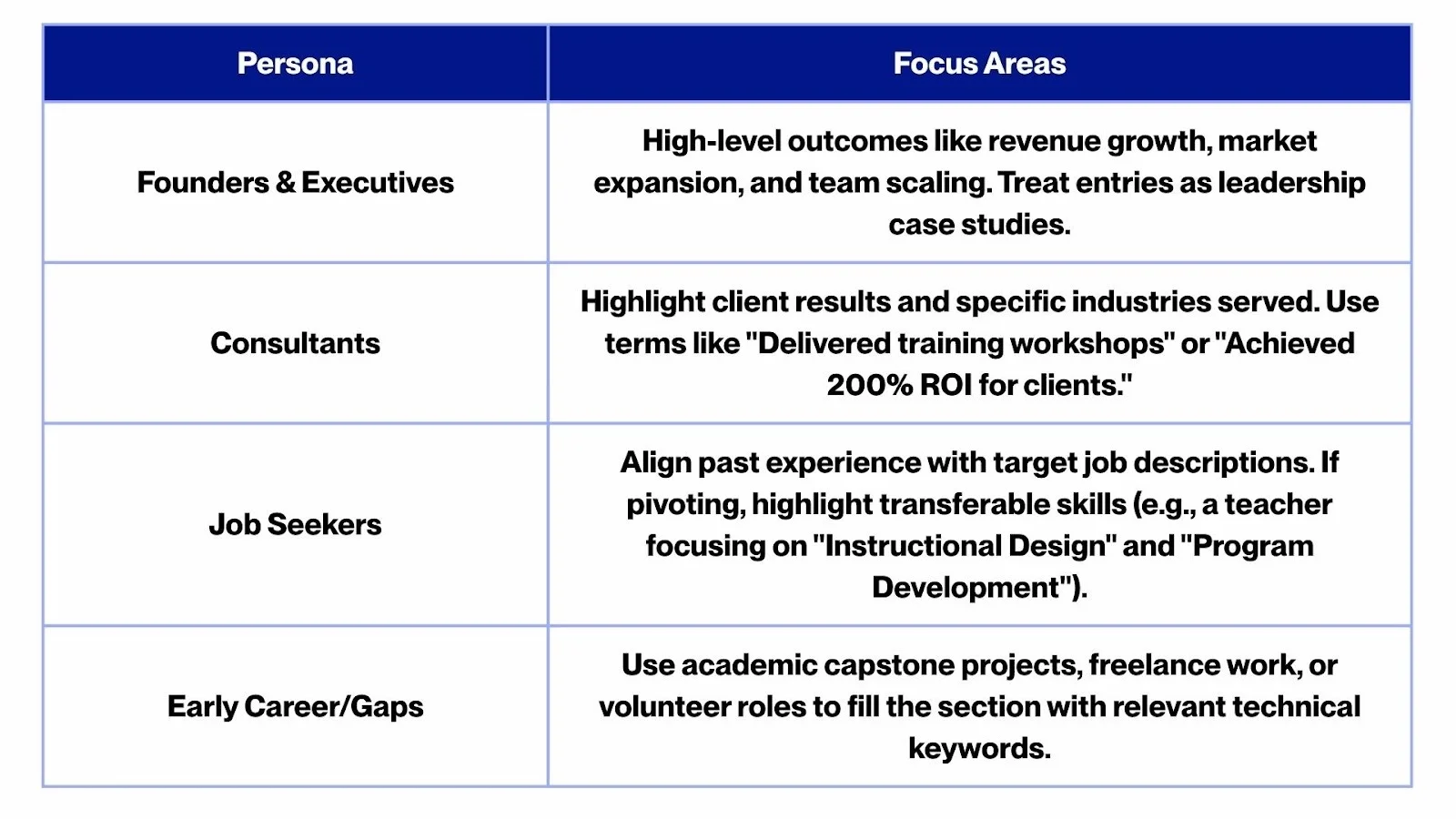
Your Experience section is more than a chronological list of jobs, it is a searchable portfolio. Every role you add is an opportunity to appear in search results. To maximize this, you must optimize each entry for both the algorithm and the human reader.
Optimize Your Titles and Descriptions
- Use Standard Job Titles: Ensure your job title uses terms people actually search for. If your official title was niche or internal (e.g., "Customer Happiness Lead"), add the industry standard in parentheses: "Customer Happiness Lead (Customer Success Manager)."
- Write Achievement-Oriented Bullets: Instead of listing "responsibilities," focus on what you accomplished. Use the formula: Action Verb + Key Task/Skill + Result/Metric.
- Example: "Implemented a new CRM system (Salesforce) to automate pipeline tracking, improving sales team efficiency by 30%."
- Integrate Industry Terminology: Use 3–5 relevant keywords per role. If you work in supply chain, include terms like "Lean Six Sigma" or "Logistics Optimization." If you work in tech, name-drop specific frameworks and tools (e.g., Python, AWS, Agile).
Demonstrate Scope and Progress
- Show Growth: Highlight increasing responsibility in each successive role. Mention the size of the team you managed, the budget you oversaw, or the scale of the projects you led (e.g., "Managed a $10M portfolio").
- Multiple Current Roles: If you are a founder who also serves as an advisor or board member, list these as separate entries. This broadens your keyword footprint but ensure they reinforce your primary brand rather than diluting it.
Persona-Specific Strategy
Layout and Readability
Recruiters skim this section quickly. Use bullet points rather than dense paragraphs. Start each bullet with a strong action verb and ensure the most important keywords are placed early in the sentence. This creates a profile that is both easy for a human to scan and easy for the algorithm to index.
Step 5: Leverage Skills, Endorsements, and Recommendations
The Skills section is a direct SEO booster for your profile. Treat these as the "tags" for your personal brand. While LinkedIn allows up to 50 skills, precision and relevance are more important than quantity in 2026.
Optimize Your Skills List
- Max it Out Thoughtfully: Identify the hard skills, software, and certifications relevant to your goals. A Product Manager should list "Product Strategy" and "Agile Scrum," while a Data Scientist would prioritize "Python" and "Machine Learning."
- Pin Your Top 3: LinkedIn allows you to "pin" three powerhouse keywords. These are displayed most prominently and carry significant weight in filtered search results. Ensure these three align exactly with the primary roles you want to attract.
- Build Skill Clusters: LinkedIn rewards structured clusters of related skills. If you are a leader in tech, adding "Product Development," "Product Strategy," and "Product Roadmapping" together reinforces your domain authority to the algorithm.
- Prune Legacy Skills: Remove outdated or irrelevant skills. A profile with 30 tightly aligned skills appears more focused and professional than a profile with 50 skills that include legacy technology or unrelated hobbies.
Credibility and Social Proof
- Gather Endorsements: While not the heaviest ranking factor, endorsements act as social proof. Aim for at least a dozen endorsements on your primary skills to signal to both the algorithm and recruiters that your expertise is verified by others.
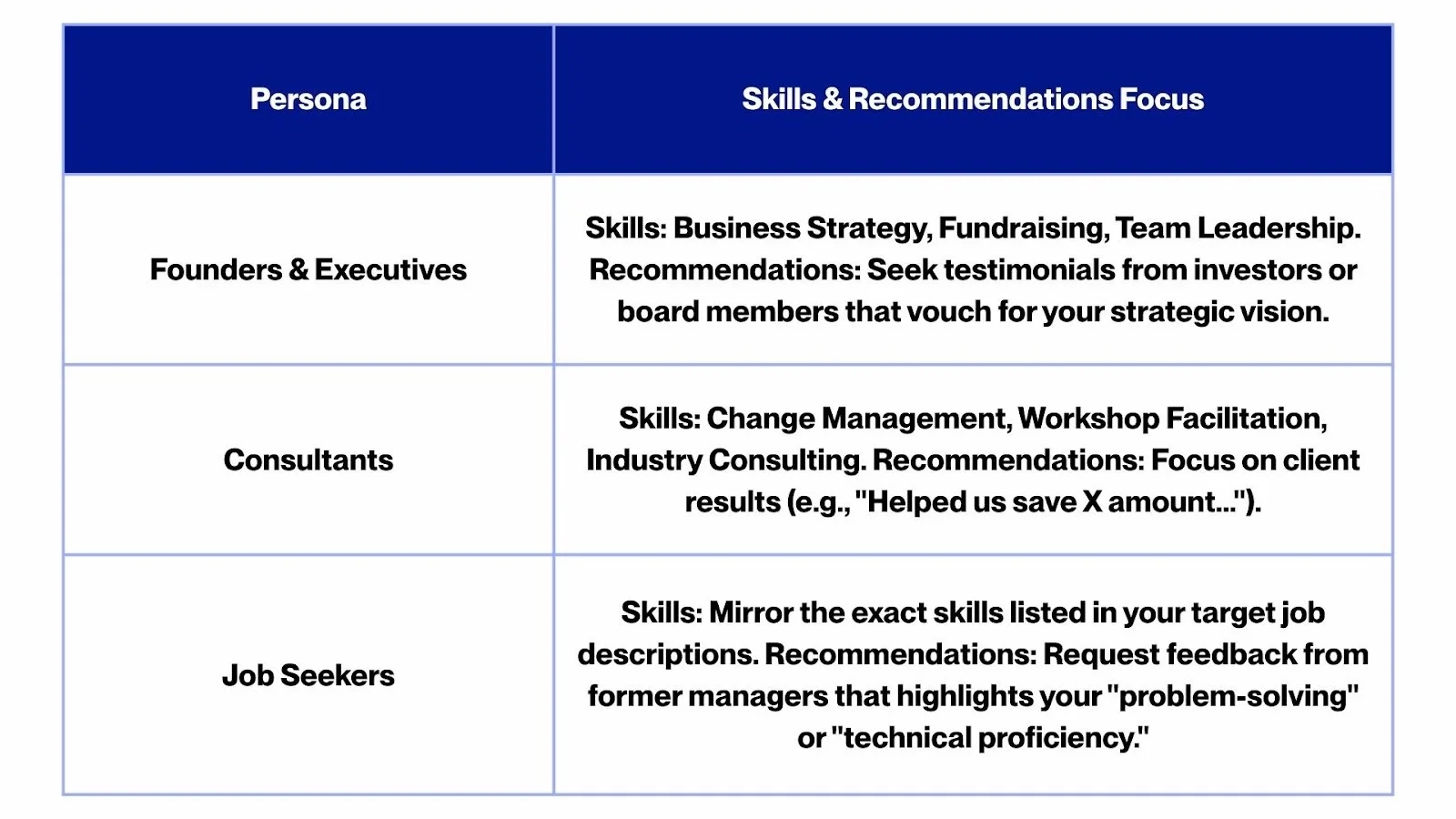
- The Power of Recommendations: Recommendation text is searchable and often naturally contains keywords. A testimonial that mentions your "leadership" or "SEO expertise" reinforces your profile’s richness. High-authority recommendations from managers or clients can be the deciding factor that converts a profile view into an inquiry.
Persona-Specific Strategy
Summary
Think of your Skills section as the hashtags for your professional life. The more relevant your tags, the more ways you can be discovered. By reinforcing these skills with endorsements and recommendations, you build a profile that is optimized for search and engineered for trust.
Step 6: Technical Optimization – Photos, URLs, and Settings
With your core content optimized, these auxiliary sections and settings provide the final edge needed for search visibility and brand authority.
Visual Branding
- Professional Photo & Banner: While they don’t contain searchable text, they dictate your click-through rate. Use a high-quality headshot and treat the banner as a billboard. For example, a consultant should use a banner featuring a tagline like "Driving Growth for Healthcare Practices" to immediately signal expertise to visitors.
- Custom URL: Change your LinkedIn URL to a clean version. This is more professional for resumes and helps external search engines like Google index your profile more effectively.
Visibility & Discoverability
- Public Settings: Ensure your profile visibility is set to "Public." This allows your profile and any LinkedIn Articles you write to be indexed by Google, surfacing your brand even outside of the platform.
- Location and Industry: Recruiters rely heavily on these filters. Use an accurate location and select an industry that aligns with your target role, even if it differs slightly from your current one.
- Education & Certifications: Fully complete these sections. Certifications like "PMP," "CFA," or "AWS Certified" are high-value keywords that recruiters search for specifically within these dedicated fields.
Advanced Features
- Accomplishments: Use the Publications, Projects, and Honors sections to drop additional niche keywords. If you are multilingual, adding languages can help you appear in searches for roles requiring specific regional expertise.
- Creator Mode: Enable this if you post content regularly. It allows you to display up to five topic hashtags (e.g., #AI, #Leadership) directly under your headline. These act as SEO tags that tell both users and the algorithm exactly what you talk about.
- "Open To" Features: * Job Seekers: Use "Open to Work" to list specific job titles and locations.
- Consultants: Use "Providing Services" to appear in the LinkedIn Services marketplace for terms like "Content Writing" or "Executive Coaching."
Maintain Momentum
LinkedIn values recency. A profile that is updated every few months, adding new projects, certifications, or a fresh headline, signals to the algorithm that you are an active, engaged user. This "freshness" factor can give you a slight edge in search frequency over stagnant profiles.
Step 7: Showcase Your Best Work in the Featured Section
The LinkedIn Featured section is prime digital real estate. Located directly below your "About" section, it transforms your profile from a text-based resume into a dynamic portfolio. In 2026, this section is a critical "proof vault" that validates your authority and can even influence external search visibility.
What to Feature
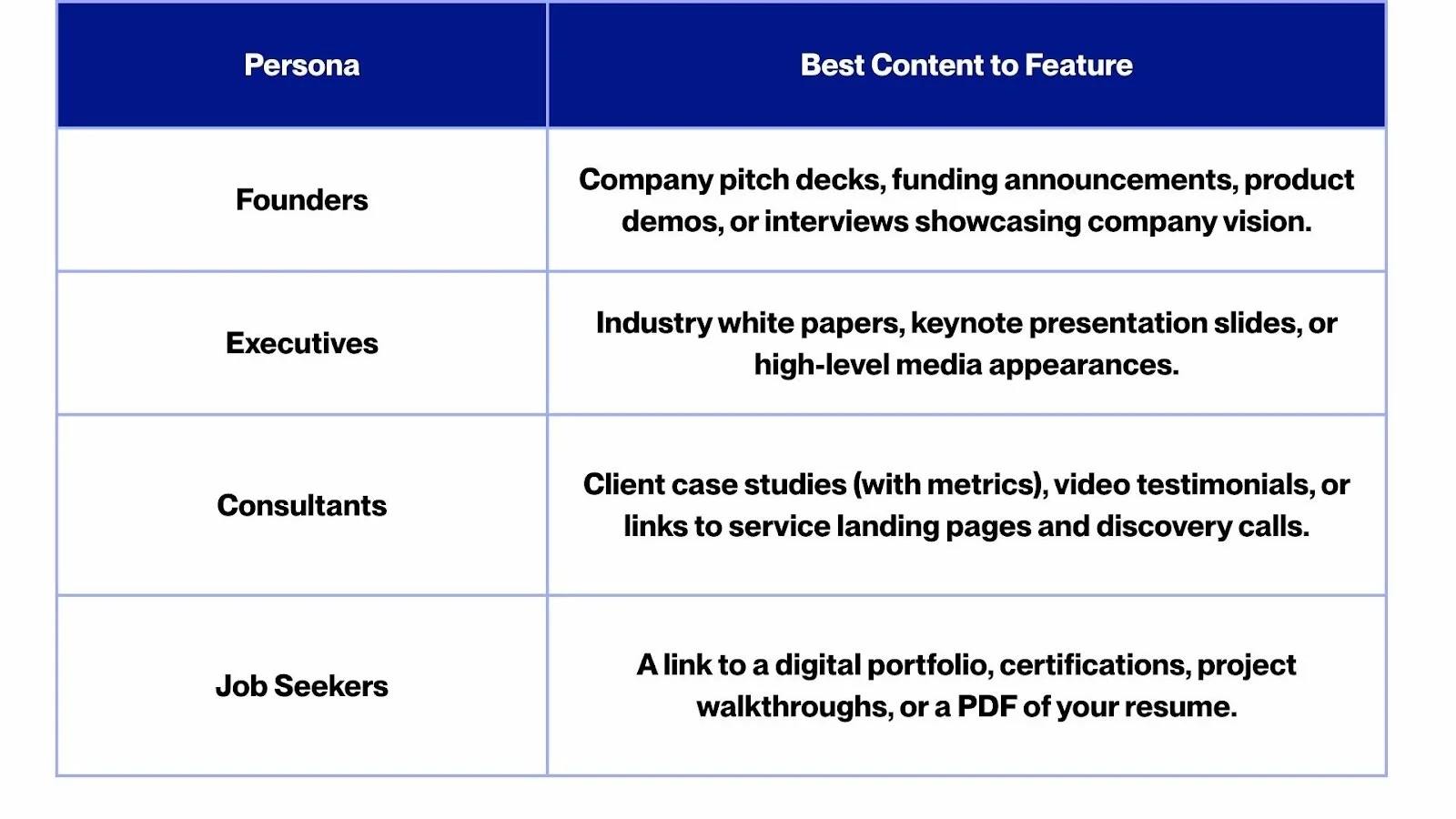
Curate a mix of 2–5 items to maintain focus while showing variety. Aim to include:
- LinkedIn Articles or Newsletters: Long-form content is indexed by Google. Featuring an article like "The Future of SaaS in 2026" can drive organic search traffic directly to your profile.
- High-Engagement Posts: Pin carousels or videos that "popped." High reaction counts provide instant social proof of your influence.
- External Links & Media: Feature your personal website, a GitHub repository, a TEDx talk, or media mentions (e.g., "Interviewed in Forbes").
- Lead Magnets: For consultants, featuring a free PDF guide or a "Book a Call" link can turn profile visitors into active leads.
SEO and Authority Impact
While the Featured section doesn't directly add keywords to your profile’s searchable text, it enhances dwell time, the amount of time visitors spend on your page. LinkedIn’s algorithm views high dwell time as a signal of quality, which can improve your overall search ranking. Furthermore, as Google increasingly indexes social content, your featured LinkedIn articles act as "digital breadcrumbs" leading searchers from Google back to your profile.
Persona-Specific Strategy
Pro-Tip: Maintain Your "Proof Vault"
The Featured section is not a "set it and forget it" tool. To stay relevant in 2026:
- Refresh Quarterly: Swap out older projects for your most recent wins.
- Order Matters: Place your most impressive achievement or highest-converting link in the first slot.
- Visual Polish: Use clean thumbnails for external links to ensure your profile looks professional and cohesive.
Here is an edited and streamlined version of your text. I have enhanced the flow, updated the tone for a professional 2026 audience, and improved the scannability.
Content Formats That Boost Discovery (and Build Authority)
Creating content on LinkedIn is the off-page SEO of personal branding. It expands your reach far beyond people directly searching for your name. In 2026, the LinkedIn algorithm prioritizes specific formats that maximize "dwell time" and meaningful engagement.
By leveraging these formats, you amplify your visibility in the feed and drive high-intent traffic to your profile. This influx of views boosts your follower count and, ultimately, improves your overall search ranking.
1. Document Posts (Carousels) – The Swipeable Goldmine
Document posts, often called carousels, are swipeable PDFs or image stacks. They are currently the "gold standard" for thought leadership because they pack high value into a compact, interactive experience.
Reach Benefits: Carousels consistently outperform standard text posts. Because users must click to progress through slides, the algorithm tracks this "dwell time" as a signal of high-quality content, pushing your post to a wider audience.
Authority Building: A carousel is essentially a mini-masterclass. It allows you to showcase deep expertise visually. Whether it’s a "2026 SEO Roadmap" or a "Case Study Breakdown," having your name and branding on every slide reinforces your status as a go-to expert.
Best Practices:
The Hook: Your first slide must have a bold, high-contrast headline that stops the scroll (e.g., "The 5 Mistakes Killing Your Lead Gen").
Visual Clarity: Use large fonts and plenty of white space. Avoid "walls of text" on a single slide.
The CTA: End with a clear Call to Action. Ask a specific question to spark comments or invite users to follow your profile for more insights.
SEO Tip: LinkedIn can index the text within your PDF. Use relevant keywords in your file name and slide headers to help your content appear in internal searches.
Ideas for your first Carousel: Industry trend reports, step-by-step "how-to" guides, "Before & After" case studies, or a curated list of tools/frameworks.
Why Consistency Matters
Every carousel that gains traction acts as a bridge to your profile. When a connection engages, their entire network sees your expertise. If your profile is already optimized, these "discovery moments" convert casual scrollers into long-term followers and high-value connections.
2. LinkedIn Newsletters & Articles: Long-Form Content with Longevity
LinkedIn Articles and Newsletters represent the long-form strategy of the platform. While standard posts have a short lifespan in the feed, these formats are evergreen and searchable via LinkedIn and Google.
Newsletters
In 2026, the newsletter feature is a premier tool for direct distribution. When you publish an edition, subscribers receive both an email and an in-app notification. This allows you to bypass the traditional feed algorithm and reach an interested audience directly. When you launch a newsletter, LinkedIn typically notifies your entire network to invite them to subscribe. Consistent publishing on a specific theme, such as Weekly AI Insights, solidifies your authority and ensures followers associate your name with that topic.
LinkedIn Articles
Articles function as blog posts hosted on your profile. Although they may receive fewer instant views than a feed post, they offer a significant SEO advantage. LinkedIn articles are indexed by Google, meaning your content can attract external traffic from search engine results. An article titled Guide to LinkedIn SEO in 2026 could draw in readers from outside your immediate network for months or even years.
Reach and Discovery
While newsletters primarily target subscribers, engagement from those readers can push the content into the feeds of their connections. High-performing newsletters often build audiences of thousands, providing a guaranteed reach for every piece of content. Furthermore, LinkedIn rewards native content. Because articles keep users on the platform rather than sending them to external websites, the algorithm often favors this visibility over external links.
Authority Building
In-depth content allows you to demonstrate expertise more thoroughly than a short post. You can include data, cite sources, and provide detailed frameworks. This depth of knowledge builds significant credibility. Maintaining a regular publishing schedule establishes you as a reliable voice and a go-to resource in your industry.
Best Practices
- Optimize Headlines: Use compelling titles with relevant keywords to improve open rates and search rankings.
- Prioritize Readability: Format your text with subheadings, short paragraphs, and bullet points.
- Visual Appeal: Include a high-quality banner image to make the content more professional.
- Encourage Subscription: Periodically remind your network to subscribe and promote the newsletter across other social channels.
- Maintain Consistency: Whether you publish weekly or monthly, a regular cadence trains your audience to expect your content and signals to LinkedIn that you are a reliable creator.
Long-form content is your opportunity to influence how the market perceives you and to be discovered by those seeking deep, specialized information.
3. Native Video Content: Humanize and Energize Your Brand
Video content on LinkedIn has grown significantly, with the platform prioritizing this format to drive higher interaction. On average, native LinkedIn videos receive five times more engagement than other content types, and live videos see even higher participation rates.
- Reach Benefits: The algorithm prioritizes native video uploaded directly to the platform over external links like YouTube. Because videos autoplay in the feed, they naturally capture attention. LinkedIn often promotes high-performing videos to second and third-degree connections. Since fewer users post video compared to text or images, there is less competition, allowing your content to stand out.
- Authority Building: Video allows you to showcase your personality and communication skills directly. Hearing and seeing you builds trust faster than text alone. Sharing insights on camera positions you as a confident and knowledgeable expert. For executives, video puts a human face to a brand. For job seekers, a well-executed video about a project or industry trend creates a memorable professional impression that few others provide.
- Effective Video Formats:
- Talking-head tips: Share two or three quick insights directly to the camera. Keep these under two minutes to cater to fast-scrolling audiences.
- Micro case studies: Use storytelling to explain how you or your team solved a specific problem.
- Behind the scenes: Share snippets from industry events or interesting professional activities.
- Interviews: Post short clips of conversations with other experts or highlights from webinars.
- Captions and Visual Hooks: Many users watch videos on mute, so it is essential to include captions. You can use LinkedIn's auto-caption tool or add your own. Including a text overlay at the start of the video helps hook viewers by immediately stating the topic.
- Live Video and Webinars: LinkedIn Live sessions send notifications to your followers, which can dramatically increase visibility. Live content often receives 24 times more engagement than standard video and continues to gain views through replays. Hosting live Q&A sessions or panels is a highly effective way to build community.
- Video Strategy: Consistency is key to success. Consider a weekly series to train your audience to expect your content. Engaging with other creators' videos can also encourage them to reciprocate, further boosting your reach.
Video conveys authenticity and accelerates the process of building professional trust. Users who watch your videos are more likely to remember your brand and visit your profile, increasing direct traffic and connection opportunities.
4. Commenting and Engaging: The Networking Amplifier
Not all visibility-boosting content is content you create. Strategic commenting is one of the most underrated ways to grow a personal brand and reach new audiences. In 2026, with massive content volume, the conversation around a post is just as valuable as the post itself.
- Visibility via Comments: When you comment on a popular post, your name, photo, and headline become visible to everyone who views that content. A thoughtful or early comment can earn hundreds of likes, broadcasting your expertise to a massive audience beyond your immediate network. High-growth users often gain followers simply by being present in the comment sections of viral posts.
- Algorithmic Favor and Reciprocity: LinkedIn favors active community members. While not officially confirmed, anecdotal evidence suggests that regular engagement increases the reach of your own posts. Furthermore, people you engage with are more likely to return the favor. This creates a positive feedback loop that helps your content perform better and amplifies its reach.
- Comment Strategy Tips:
- Be Early and Consistent: Identify 5 to 10 top influencers in your niche. By commenting early on their new posts, your contribution is more likely to stay at the top and gain views. Dedicate 15 to 30 minutes daily to meaningful engagement.
- Add Value over Praise: Avoid generic comments like "Great post!" Instead, provide a unique perspective, an example, or a polite challenge. Think of comments as mini-contributions to the discussion. Adding a specific insight or a personal anecdote makes your comment worth liking and reading.
- Leverage Your Headline: Your headline appears next to your name every time you comment. If you have a keyword-rich, compelling headline, people intrigued by your insight will be more likely to click through to your profile.
- Engage on Your Own Posts: When you publish your own content, stay active in the replies. LinkedIn rewards active discussions, and responding to every comment helps boost the post's longevity and reach.
- Join Niche Discussions: Participate in industry-specific LinkedIn Groups or follow relevant hashtags. While group reach may be smaller, being a consistent voice in a specialized community leads to high-quality connections.
- Authority via Comments: Repeatedly sharing valuable insights across the platform makes you recognizable. Over time, you build a linkedin reputation as a specialist in your field. This can lead to others tagging you for your opinion or sending connection requests specifically referencing a comment you made.
Summary of Content Formats
Different formats map to reach and authority in distinct ways:
- Carousels and Videos: Generate broad reach and high engagement.
- Newsletters and Articles: Build deep authority and long-term SEO presence.
- Commenting: Acts as daily micro-networking that steadily grows your influence.
The most effective strategy is a mix of these formats tailored to your style. Consistency ensures you remain on the radar of both the LinkedIn algorithm and your target audience.
LinkedIn Keyword Research Mini-Method (Find Your Niche Phrases)
Optimizing for LinkedIn SEO requires knowing which keywords to incorporate into your profile and content. Traditional SEO tools like Google Keyword Planner may not directly reflect LinkedIn search volumes, so a platform-specific approach is essential. Use this simple keyword research method to discover the phrases that matter in your niche.
1. Title-Based Queries via LinkedIn Search
Treat the LinkedIn search bar as a live keyword tool. As you type a common title or skill, note the auto-complete suggestions. These results reflect popular searches and standard professional terminology.
Pro Tip: Type your role followed by each letter of the alphabet (e.g., "Product Manager A...", "Product Manager B..."). This often reveals specific specializations, such as "Product Manager AI," that you might have otherwise overlooked.
2. Competitor Headline Mining
Identify 5 to 10 successful professionals in your field. Examine their headlines, "About" sections, and skill lists to find recurring patterns.
- If multiple top-tier profiles emphasize terms like "Performance Marketing" or "Growth Strategist," these are likely high-intent keywords recruiters use.
- Do not copy their branding, but do use their keyword choices to inform your own if you genuinely possess those skills.
3. Role + Niche Combination Brainstorming
Validate the viability of niche combinations by pairing your primary role with specific industries or specializations.
- Examples: "Accountant + Healthcare," "Accountant + FinTech," or "Accountant + Real Estate."
- Search for these exact phrases. If a combination like "Real Estate Accountant" yields many results, it is a recognized and searched-for niche. If it yields almost none, it may be too narrow or not the terminology your industry uses.
4. Job Posting Keyword Extraction
Analyze three to five job descriptions for roles you are targeting. Highlight recurring nouns and adjectives related to skills, tools, and expertise.
- Recruiters often use Boolean searches,such as (Job Title) AND (Skill) AND (Industry), to find candidates. By mirroring the language found in job postings (e.g., "pipeline management," "lead nurturing," "Salesforce"), you ensure you appear in these filtered results.
5. LinkedIn’s Native Insights Tools
- Skills Insight: In your profile's "Skills" section, click "Add skills" and start typing a broad term. LinkedIn will suggest specific, related keywords based on its internal data.
- Career Explorer: Use LinkedIn’s Career Explorer tool to see how your current skills overlap with target roles. It provides a list of "Skills to Build" and "Popular Skills" that act as excellent keyword fodder.
6. Review Search Appearance Analytics
Regularly check your "Search Appearances" on your personal dashboard. This feature reveals the keywords people used to find your profile.
- If the keywords listed do not align with your goals, adjust your profile text to prioritize the terms you want to be known for. If you want to be found for "SQL" but it isn't appearing in your analytics, increase its prominence in your headline and experience descriptions.
Partnering with a Personal Branding Ally: Ohh My Brand
Executing a consistent LinkedIn SEO and personal branding strategy is a significant time investment. For busy professionals, founders, and executives, partnering with a personal branding agency like Ohh My Brand can act as a powerful force multiplier.
Founded by Bhavik Sarkhedi, a Forbes-recognized branding expert, Ohh My Brand specializes in positioning professionals as the undisputed authorities in their fields. They move beyond basic profile updates to provide a high-level, "hands-on" strategy that integrates storytelling with data-backed SEO.
How a Strategic Ally Adds Value:
- Profile and SEO Overhaul: Ohh My Brand performs comprehensive audits to identify visibility gaps. They optimize your profile using the latest algorithm trends, ensuring your headline, "About" section, and skills are engineered to rank for high-intent searches.
- Ghostwriting and Content Strategy: If you lack the time to write, their team translates your unique insights into high-performing carousels, newsletters, and long-form articles. This ensures your content calendar remains active without requiring hours of your weekly schedule.
- Narrative Positioning: Personal branding is about more than just keywords; it is about your story. Agencies help you refine your narrative, positioning your past experiences to directly support your future business or career goals.
- Active Engagement: Unlike agencies that only post and disappear, Ohh My Brand manages the "networking" aspect of LinkedIn. They can handle engagement, responding to comments and interacting with industry leaders, to humanize your brand and spark meaningful conversations.
- Measurable ROI: By acting as your personal marketing team, they track analytics and adjust strategies in real-time. This professional management accelerates network growth and increases inbound opportunities, such as speaking gigs, partnerships, and high-value leads.
The "CEO" Mindset
Think of yourself as the CEO of "Brand You." Partnering with an agency provides you with a CMO and a creative team to handle the technical and creative heavy lifting. This allows you to focus on your core work while your digital presence reflects your true level of achievement to the world.
Whether you are a startup founder looking for VC interest or a consultant aiming for a "Top Voice" badge, leveraging professional expertise can fast-track your journey to LinkedIn authority.
LinkedIn SEO Optimization Checklist (Copy and Paste)
Use this checklist to ensure every section of your profile is engineered for maximum searchability and professional impact. Tick off each item as you complete it to build a high-ranking LinkedIn presence.
Headline and Visuals
- Headline Keywords: Includes your target role and 2–4 top skills or value propositions. Uses vertical bars | or symbols for clarity (e.g., Cloud Architect | AWS Expert | IoT Transformation).
- Headline Front-Loading: The most critical title or keyword is in the first 70 characters to ensure it isn't cut off in mobile previews.
- Profile Photo: High-quality, professional, and friendly. Your face occupies roughly 60% of the frame against a clean background.
- Custom Banner: A custom graphic or professional image related to your field replaces the default blue background to reinforce your brand.
About Section
- Strong Opening: Starts with a "hook" or mission statement that defines your professional "why" in 1–2 sentences.
- Skill Integration: Naturally weaves 5–10 relevant keywords and industry terms into your career narrative.
- Quantified Achievements: Highlights 2–3 major successes using specific metrics (%, $, or time saved).
- Readability: Uses short paragraphs and bullet points to avoid dense walls of text.
- Clear CTA: Concludes with a call to action, inviting users to connect, collaborate, or contact you for specific services.
Experience and Skills
- Optimized Job Titles: Every role uses standard industry titles. Descriptions focus on results rather than daily duties, starting with strong action verbs (e.g., Led, Developed, Accelerated).
- Skill List (15–50): Includes a mix of hard skills, software proficiency, and methodologies.
- Pinned Skills: The top three skills that represent your core expertise are pinned to the top of the section.
- Endorsements and Recommendations: Aim for 5+ endorsements on top skills and at least 2–3 recent written recommendations to provide social proof.
Featured and Technical Details
- Featured Section: Contains 2–5 high-value items, such as a portfolio link, a viral post, a media mention, or a significant article.
- Custom URL: Profile link is cleaned up (e.g., linkedin.com/in/your-name) for better shareability and search indexing.
- Location and Industry: Updated to reflect your target market, ensuring you appear in filtered recruiter searches.
- Contact Info: Email and relevant professional links are up-to-date and visible to your intended audience.
Advanced Settings and Maintenance
- "Open To" Settings: Enabled for "Work" (if job seeking) or "Services" (if consulting), using targeted keywords for specific roles or offerings.
- Certifications: All relevant licenses and education are listed with their full, searchable names (e.g., Project Management Professional).
- Creator Mode: If active in content, enabled with five relevant hashtags that align with your expertise.
- Analytics Review: A weekly check of "Search Appearances" to see which keywords are driving traffic.
- Quarterly Audit: A calendar reminder to refresh your headline, achievements, and skills every 90 days.
Conclusion: Your Personal Brand in 2026 and Beyond
In 2026, LinkedIn SEO has become synonymous with personal branding success. Understanding the mechanics of LinkedIn search and deliberately optimizing your profile around the right keywords dramatically increases your professional visibility. However, a high-ranking profile is only half the battle. To maximize your impact, you must pair that optimization with consistent, value-driven content, ranging from eye-catching carousels to insightful community comments.
Whether you are a founder seeking investors, an executive building thought leadership, a consultant attracting high-ticket clients, or a job seeker landing a dream role, mastering LinkedIn SEO ensures that opportunities start coming to you rather than you having to chase them.
The strategies covered in this guide, from technical keyword research to creative content production, are tools designed to tell your unique story in a language that both people and algorithms understand. Implement these changes, maintain your authentic voice, and iterate based on what resonates with your audience.
With persistence, you will transform your LinkedIn profile into a magnet for the connections and opportunities that define your career. Armed with this guide and the support of strategic allies like Ohh My Brand, you are ready to transform your presence. It is time to rank at the top and let your personal brand rise above the noise. Contact Ohh My Brand for more details today!


.svg)
.svg)
.svg)
.svg)



.svg)